Is the redeem button on the Roblox website?
No. MENU → SETTINGS → Codes in-game.

How to redeem Raise a Champion codes: finish tutorial, MENU, SETTINGS, Codes box. Not roblox.com/redeem. WEEK2 needs Level 10. Place 136630573385736.
Menu → Settings claim path. GameWala.
~5 min read
This how to redeem Raise a Champion codes page is the click path for Roblox Place 136630573385736 — Raise a Champion by natezzzski. The working strings live on codes. Verified November 15, 2026 · Play on Roblox.
Path: finish tutorial → left MENU → upper-right SETTINGS → bottom Codes → paste → REDEEM. Not roblox.com/redeem. WEEK2 still needs Champion Level 10.
| Fact | Detail |
|---|---|
| Place | 136630573385736 |
| HUD | MENU left · SETTINGS upper-right · Codes bottom |
| Unlock | Finish the short tutorial |
| Website | Do not use roblox.com/redeem |
| WEEK2 | Champion Level 10 |
| Verified | November 15, 2026 |
Launch Raise a Champion and wait until the tutorial arrows finish the first Chapter 1 fight. Codes sit behind the menu, not on the Roblox website.
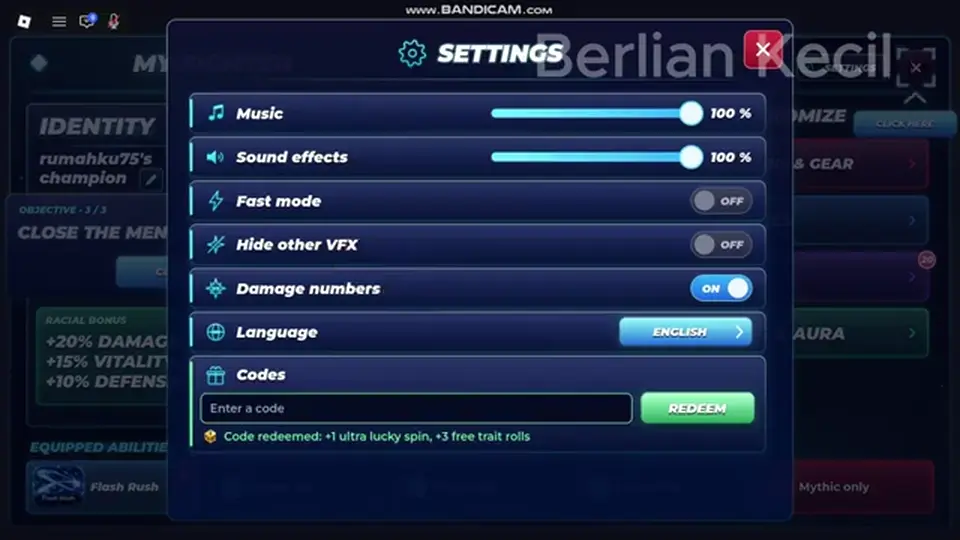
Open the left-side MENU icon. In that window, choose SETTINGS in the upper-right. Scroll until you see Codes and an Enter a code box. Paste one token. Press REDEEM. Read the toast before you paste the next string.
| Step | Control | Fail if you… |
|---|---|---|
| 1 | Join Place 136630573385736 | Open a different Champions game |
| 2 | Finish tutorial | Hunt Codes during the first arrow |
| 3 | MENU (left) | Open Roblox settings instead of in-game MENU |
| 4 | SETTINGS tab | Stay on a different menu tab |
| 5 | Codes field at bottom | Paste into chat |
| 6 | REDEEM once per string | Glue THANKSFOR95WEEK2 together |
THANKSFOR95 includes digits. WEEK2 includes a digit. UPD1 includes a digit. Overlay typos in recap videos (thanks for 495) are not extra codes.
Matched by build plan, shared topics, and guide progression — not random related links.
Public recaps say the field unlocks after the short tutorial. If you still do not see it, you are probably still on the blue-arrow path or in a fight UI that hides MENU.
Teleport out of the arena after Stage 1, then open MENU again. If MENU is visible but Codes is missing, you are not done with the tutorial shop step (Starter Glove).
Berlian kecil’s session teleported, bought the free glove, then saw tutorial complete. Codes can sit before or after that toast — if the field is missing, finish the glove. Beginner guide.
A reject is not always expiry. Check Place ID, spelling, extra spaces, already-redeemed, and the Level 10 gate on WEEK2.
Do not “fix” a code by adding spaces or changing case. If WEEK2 fails and you are under Level 10, the string can still be Active for later.
| Symptom | Check next |
|---|---|
| Rejected after typing | Copy from the codes table; strip spaces |
| WEEK2 rejected | Champion Level 10 on the HUD |
| No Codes field | Tutorial / glove step not done |
| Website form error | You used roblox.com/redeem — stop |
| Already redeemed | Each code is once per account |
THANKSFOR95 and UPD1 grant Spins (Race + combat Abilities) and Trait Rolls. Do not dump Trait Rolls hoping for a new Race. Read spins before you click.
Weapons still cost coins in the shop. Codes do not replace the Starter Glove path.
Every named November 2026 codes page that prints steps agrees on the skeleton: launch Raise a Champion, finish the tutorial, open MENU on the left, open SETTINGS in the upper-right of that menu, find Codes at the bottom, paste, Redeem. Destructoid, PGG, GAMES.GG, and GameRant all say the website form is not the path. Berlian kecil demonstrates a successful THANKSFOR95 paste and a WEEK2 Level 10 reject in the same Codes box. That is the still you want at 01:26–02:12, not a GIF of the whole tutorial.
Unlock logic is the part players miss. If MENU is hidden, you are probably still inside the first fight camera. If MENU exists but Codes does not, the tutorial shop step (free glove) may still be incomplete. The recap shows teleport → free glove → tutorial complete toast in that order after the first codes attempt. Your account can differ by a few clicks; the rule is “finish the blue arrows and the shop prompt,” not “stand in a locked Arena 3 lobby hoping Codes appears.”
Reject logic is also not always expiry. Copy from the table so THANKSFOR95 keeps its digits. WEEK2 under Level 10 is a gate. Already-redeemed is once per account. Wrong Place (Rebirth Champions Ultimate, NBA Champions) burns nothing useful here and may burn a string on the other game. Gluing two tokens into one paste creates a third string nobody listed. Clear the field between Redeems.
After a successful toast, do not immediately reroll Race unless you know you are on the Spin UI. THANKSFOR95 also grants Trait Rolls. Park those until the Trait slot is on screen. Then push stages so WEEK2 can pay. Capture stills of MENU icon, SETTINGS tab, Codes field, success toast, and Level 10 reject — five stills, zero animated WebP this run.
Step list you can screenshot later from GameWala aYEOkmF8z5k 00:13–00:22 plus Berlian kecil 01:26–02:12: launch Place 136630573385736, finish arrows, finish shop glove, open left MENU, open SETTINGS, scroll to Codes, paste THANKSFOR95, Redeem, clear, paste UPD1, Redeem, leave WEEK2 until the champion level reads 10. If MENU is missing, you are still in the first camera. If Codes is missing, finish the tutorial toast.
Reject dictionary without inventing new errors: Level 10 gate, already redeemed, wrong case, extra space, two tokens glued, wrong Place, expired (none archived on this snapshot), WEEK3 Unverified so a reject there is not proof the other three died. After a success toast, park Trait Rolls until the Trait slot is visible and park Lucky Spins until the Race/Ability banner is visible.
Website form reminder: every named November 2026 recap that prints a path uses the in-game box. roblox.com/redeem is for Roblox catalog promotions, not this Place’s Spin tickets. If a thumbnail shows a browser bar, ignore that still for this wiki.
Five stills to grab later, zero GIFs: MENU icon, SETTINGS tab, Codes field empty, THANKSFOR95 success toast, WEEK2 Level 10 reject. GameWala aYEOkmF8z5k is the claim overlay; Berlian kecil Z9BxyjBcfzI is the live box. Prefer the live box when the field is readable.
Working list: codes. If WEEK2 is locked, leveling. First hour: beginner guide.
No. MENU → SETTINGS → Codes in-game.
No. This wiki does not publish a Discord invite. The Codes field is in Settings.
THANKSFOR95 and UPD1 after tutorial. WEEK2 after Level 10.
Matched by build plan, shared topics, and guide progression — not random related links.